Malaysia Government Offers 3 Months of Free Coursera: Rakyat Digital Application and Course Guide
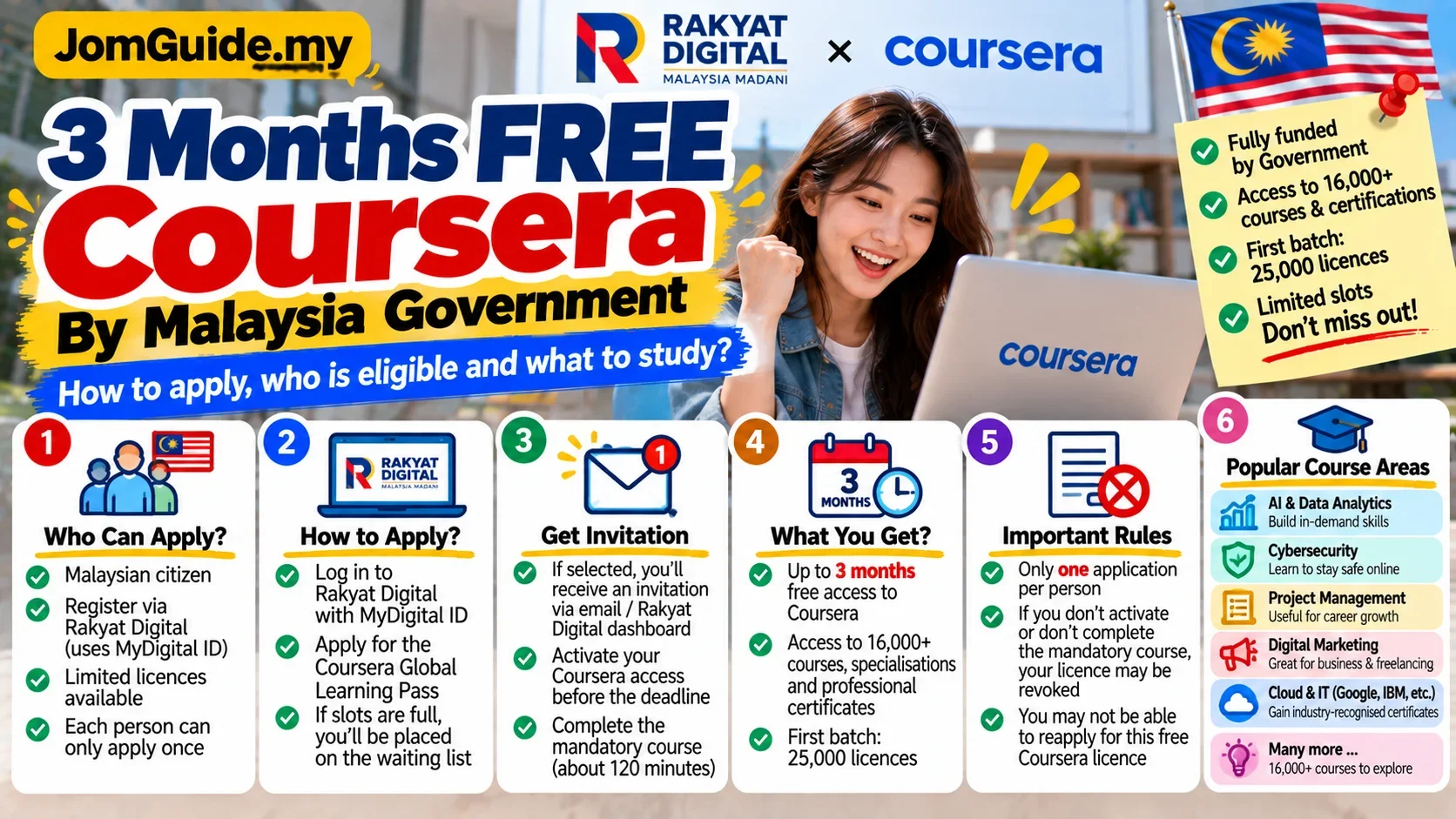
Rakyat Digital's Global Learning Pass offers eligible Malaysians up to three months of free Coursera access. Licences are limited and each learner gets only one registration opportunity, so it is worth understanding the waitlist, activation deadlines and course choices before applying.

Source: Source: Rakyat Digital Digital Skills Hub and Coursera Terms, accessed Oct 2026
You may have heard that the Malaysian Government is offering free Coursera access but not known where to start.
Rakyat Digital's Global Learning Pass currently offers:
up to three months of free Coursera access
funded by the Government of Malaysia.
But there are several important conditions:
- Malaysian citizens only;
- Rakyat Digital registration uses MyDigital ID;
- licences are limited;
- the first cohort has 25,000 licences;
- each learner gets only one registration opportunity;
- an invitation must be activated within the programme timeline;
- a compulsory course of about 120 minutes must be completed;
- inactive licences can be revoked and recycled.
The most important rule: one application opportunity
Rakyat Digital's Coursera Terms state that each learner is permitted only one registration for the free licence initiative.
The no-reapplication policy is strict.
Once your registration has been processed for licence allocation, you cannot simply reapply later because:
- you activated the licence;
- you failed to activate in time;
- your licence expired;
- it was revoked for non-compliance;
- or you did not receive a licence because capacity was full.
That means this is not a programme to register for casually and “come back to someday”.
Apply when you are realistically ready to learn.
Who can apply?
The core eligibility requirements are:
- Malaysian citizen;
- registered on the Rakyat Digital portal;
- registration through MyDigital ID;
- acceptance of the programme policies.
If you do not yet have MyDigital ID, complete that registration first.
What is the Global Learning Pass?
The Global Learning Pass sits inside Rakyat Digital's Digital Skills Hub.
The official page describes access to learning from providers and institutions such as:
- Google;
- IBM;
- Yale;
- other training and education partners on Coursera.
The purpose is to help Malaysians develop in-demand digital and career-relevant skills.
Coursera certificates may be available for applicable courses, subject to individual course requirements.
Step 1: Register on Rakyat Digital
Go to the official Rakyat Digital portal and register using MyDigital ID.
Use an email address you regularly check because:
- invitation emails are sent there;
- reminders are sent there;
- waiting-list availability is communicated by email.
Step 2: Open the Digital Skills Hub
After logging in, find the:
Global Learning Pass / Coursera
section.
This is where the free three-month programme is listed.
Step 3: Join the Coursera Licence Waitlist
The official terms say applicants first join the Coursera Licence Waitlist.
You need:
- an active email address;
- acceptance of the Coursera disclaimer and terms;
- completed programme registration.
You then enter the verification and onboarding queue.
Step 4: Watch for the invitation
Subject to verification and licence availability, the programme terms say eligible applicants may receive an activation invitation within 48 hours.
If all 25,000 licences have already been allocated, verified applicants are placed on a waiting list.
As licences are recycled, eligible users can be notified when capacity becomes available.
Do not ignore the invitation email
This is where many people could lose the opportunity.
The programme timeline includes:
Day 0
You receive an onboarding email with the activation link.
By Day 7
You should:
- activate the Coursera licence;
- complete the automatically enrolled compulsory course.
That compulsory course is approximately 120 minutes.
If it is incomplete, a reminder can be sent.
Around Day 14
A final reminder can be issued if activation or completion is still outstanding.
Around Day 16
Continued non-compliance can lead to the licence being revoked and reallocated.
The practical approach is simple:
activate early and complete the compulsory course first.
When does the three-month period start?
The licence is valid for approximately three months according to the programme timeline, with the official terms tying access to the invitation and activation process.
Do not assume you can apply today and “start the three months whenever you feel like it”.
Only apply when you can use the access.
Why is the compulsory course required?
It is part of the programme's learning commitment.
After activation, learners are automatically enrolled in one designated course of roughly 120 minutes.
Failure to complete it within the required window can lead to the licence being revoked.
A sensible sequence is:
activate → finish compulsory course → choose your main learning track.
What should you learn?
Instead of choosing by course title alone, choose by what you want to use the skill for.
AI and Generative AI
Useful for:
- office productivity;
- content and marketing;
- workflow automation;
- managers and students who need AI literacy.
Look for fundamentals, responsible use and practical workflow applications rather than only prompt tricks.
Data Analytics
Useful for:
- analyst roles;
- finance, sales and operations;
- people who work with spreadsheets, dashboards and reports.
Relevant areas can include:
- spreadsheets;
- SQL;
- data visualisation;
- statistics fundamentals;
- analytics projects.
Cybersecurity
Useful for:
- IT support;
- people exploring security careers;
- SME owners who need basic security awareness;
- learners interested in networks or security operations.
Project Management
Useful for:
- office professionals;
- team leads;
- operations roles;
- people managing deadlines, stakeholders and deliverables.
Digital Marketing
Useful for:
- SME owners;
- marketing and social-media roles;
- freelancers;
- learners interested in SEO, advertising, analytics or content strategy.
Software, Cloud and IT
Useful for:
- aspiring tech workers;
- junior developers;
- IT support;
- people building programming or cloud foundations.
Do not enrol in everything just because it is free
Three months passes quickly.
A better strategy for a beginner is:
- choose one main skill;
- add one supporting skill.
For example:
Data Analytics + AI productivity
is more realistic than enrolling in ten unrelated programmes and finishing none.
Are the certificates useful?
A certificate shows structured learning was completed, but it is not a guarantee of employment.
Its value is stronger when combined with practical work.
Examples:
- Data Analytics → build a dashboard project;
- AI → document a useful workflow;
- Project Management → apply the method to a real project;
- Digital Marketing → create a campaign case study.
Think of it as:
course + practical skill + evidence of use
rather than certificate alone.
Use the same email where possible
Rakyat Digital specifically advises learners to use the same email linked to their Rakyat Digital account when registering on Coursera.
This helps learning progress and certificates sync properly.
What if all 25,000 licences are taken?
Verified applicants can be placed on the waiting list.
Capacity can open up when licences:
- expire;
- are revoked;
- are recycled to another learner.
Keep checking the email connected to your application, including spam or junk folders.
Who is this useful for?
The programme can be relevant to:
- students;
- fresh graduates;
- job seekers;
- working adults;
- SME owners;
- people changing careers or building digital skills.
But the key is whether you actually have time to use it.
Because each person gets only one registration opportunity, the best sequence is:
decide what you want to learn → register on Rakyat Digital → join the waitlist → activate quickly when invited → complete the compulsory course → focus on one or two useful learning tracks.
Useful? Forward it to someone who needs it.
Malaysian policy and hot topics, 2–3 items a week, each with a one-line “so what”.